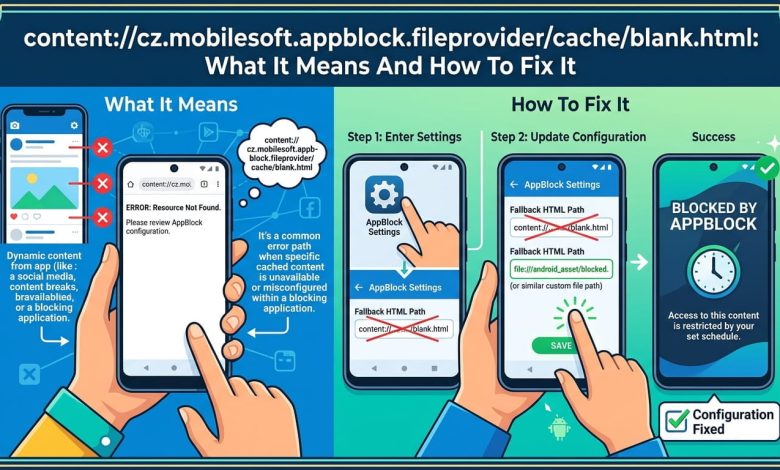
You’re scrolling through your phone and this weird string pops up in your browser bar instead of the page you wanted: content://cz.mobilesoft.appblock.fileprovider/cache/blank.html. No page loads. No error message either. Just a blank screen and a link that looks like it belongs in a developer’s console, not your Chrome app. If you’ve searched this exact phrase hoping someone stole your data or planted malware on your phone, take a breath. This article walks you through exactly what this link is, why it shows up, and three separate ways to make it stop appearing for good.
What Is content://cz.mobilesoft.appblock.fileprovider/cache/blank.html?
This link is a content URI, a file address that Android apps use to hand off files internally without exposing the raw storage path. It’s not a website. It doesn’t connect to any server. The file it points to sits on your own device, inside a cache folder that belongs to an app called AppBlock.
AppBlock is a screen-time and focus app made by a company called MobileSoft, based in the Czech Republic. That’s where the “cz” at the start of the URI comes from. The app’s whole job is to block distracting websites and apps so you can focus on something else, and this URI is the tool it uses to do that.
Breaking Down Each Part Of The URI
Each segment of the address tells you something specific:
- content:// signals a local, in-device resource, not an internet address like https:// would.
- cz.mobilesoft.appblock.fileprovider is the authority: the unique name Android uses to identify AppBlock’s file-sharing component.
- /cache/ points to a temporary storage folder the app can wipe and rebuild anytime.
- blank.html is the actual file, a near-empty page with nothing on it.
Put together, the address just means “AppBlock’s temporary blank page, stored in its own private folder.”
Why This Link Shows Up On Your Screen
You’ll usually see this URI right after trying to open a site or app you’ve already blocked. Here’s the sequence: you tap a link or type a URL, AppBlock’s monitoring service catches the request before your browser can load the real page, and it swaps in this cached blank file instead. The whole thing happens in a split second, which is why it feels like the page just failed to load.
Active Blocking Rules
If you set up a focus timer, added a site to your blocklist, or scheduled downtime hours, this is the most common trigger. AppBlock is doing exactly what you configured it to do.
Browser History And Device Logs
Because Android logs every redirect as a visited page, this string can also turn up later in your browsing history, even though you never actually reached the blocked site. It shows up in crash reports and app logs too, which is often where developers and curious users first spot it and start searching for answers.
App Debugging Sessions
Anyone poking around Android system logs while testing an app might run into this URI without ever having AppBlock actively block anything in that moment. It can simply be part of a cached record from earlier activity.
Is content://cz.mobilesoft.appblock.fileprovider/cache/blank.html Dangerous?
No. This is a standard Android content URI generated by a legitimate, well-known productivity app. It doesn’t send information anywhere, doesn’t run any code, and doesn’t grant access to files outside AppBlock’s own cache. If you didn’t install AppBlock yourself, someone else with access to your device (a parent, employer, or partner) may have set it up on your behalf, which is worth checking, but the link itself carries no security risk.
Android’s content provider system exists specifically to let apps share files safely, without exposing your device’s raw file structure to other apps. AppBlock is simply using that system the way it was designed to be used.
How To Fix Or Remove content://cz.mobilesoft.appblock.fileprovider/cache/blank.html
If the blank page is more annoying than helpful, you have three options depending on how permanent you want the fix to be.
Step 1: Edit Your Blocklist
- Open the AppBlock app.
- Tap the settings icon.
- Go to your web filtering or blocklist section.
- Find the site or app triggering the redirect.
- Remove it from the list, or toggle the rule off.
- Save your changes.
This stops the blank page from appearing for that specific site while keeping the rest of your blocking rules intact.
Step 2: Pause Blocking Temporarily
Pull down your notification shade and look for the AppBlock notification. Tap it, then choose pause or disable. This turns off all blocking until you switch it back on, and it’s the fastest option if you just need access for a few minutes.
Step 3: Clear AppBlock’s Cache
- Open your phone’s Settings app.
- Go to Apps, then find AppBlock.
- Tap Storage, then Clear Cache.
This deletes the cached blank.html file along with other temporary data. Keep in mind AppBlock rebuilds this cache the next time it blocks something, so this fix resets things rather than removing them permanently.
Step 4: Uninstall AppBlock Completely
If you no longer want the app at all, go to Settings, Apps, AppBlock, and select Uninstall. This removes the package entirely, and the content:// link will never appear on your device again. If you still need website restrictions after removing it, Chrome’s built-in site settings (found at chrome://settings/content) offer basic blocking without a third-party app.
Things The Guides Online Rarely Mention
Most articles on this topic stop at “it’s harmless, here’s how to remove it.” A few practical details tend to get skipped.
- Clearing your cache doesn’t remove your blocklist rules. Your restricted sites stay restricted, since the blocklist and the cache are stored separately by AppBlock.
- If you see this link appear even with AppBlock fully paused, check whether a second device profile or a work/parental control account is also running restrictions in the background.
- On some Android skins, particularly Samsung’s One UI, clearing app cache from the recent apps screen instead of Settings can behave differently and sometimes doesn’t fully clear AppBlock’s stored files. Going through Settings > Apps directly is more reliable.
Frequently Asked Questions About content://cz.mobilesoft.appblock.fileprovider/cache/blank.html
Is content://cz.mobilesoft.appblock.fileprovider/cache/blank.html a virus?
No, it’s not a virus. It’s a cached file created by the AppBlock app to display a blank page when it blocks a site. It doesn’t run code, connect to outside servers, or track anything beyond the site you tried to visit.
Why does this link appear in my browser history?
Android records every page redirect as a visited page, including ones AppBlock intercepts. So even though you never reached the actual blocked site, the redirect itself gets logged as a history entry.
Can I stop content://cz.mobilesoft.appblock.fileprovider/cache/blank.html from appearing?
Yes. Remove the specific site from your AppBlock blocklist, pause blocking altogether, clear the app’s cache, or uninstall AppBlock if you no longer need it. Each option offers a different level of permanence.
Does this URI mean my phone was hacked?
No. This is standard behavior from a legitimate app you or someone with access to your device installed. It’s not connected to hacking, spyware, or unauthorized access.
What does the “cz” in the URI stand for?
It’s the country code for the Czech Republic, where AppBlock’s developer, MobileSoft, is based. It’s part of the app’s package name, not an error code or warning.
Why does the page look completely blank instead of showing an error?
AppBlock is designed to swap blocked content with an empty page rather than an error screen, so the block feels clean and immediate instead of jarring.
Will clearing my cache delete my AppBlock settings too?
No. Clearing cache only removes temporary files like blank.html. Your blocklists, timers, and focus schedules are stored separately and stay intact.
Does AppBlock track my browsing outside of blocked sites?
No. AppBlock only monitors navigation attempts against the sites and apps you’ve added to your blocklist. It doesn’t log or track general browsing beyond that.
Take Control Of Your AppBlock Settings Today
This link isn’t a bug, a virus, or a sign your device is compromised. It’s just AppBlock doing its job, swapping a distracting site for a blank page based on rules you or someone else set up. Whether you want to keep it running, tweak your blocklist, or remove the app entirely, the fix takes less than five minutes.
If you’re dealing with other strange Android file paths or app permission questions, check out our guides on managing app permissions safely and clearing cached data across your device for better phone performance.