You’re watching someone’s Instagram Story and you want to save it — maybe it’s a recipe, a travel clip, or just something you don’t want to lose. So you hit record on your phone screen and let it play. Then the question hits: did Instagram just tell them?
It’s one of the most common things people wonder before they press record, and the answer isn’t a flat yes or no across the board. Instagram treats different types of content differently when it comes to screen recording notifications. Here’s exactly what does and doesn’t get flagged — Stories, posts, Reels, DMs, Close Friends content, and disappearing messages — so you know where you stand before you record anything.
Does Instagram Notify When You Screen Record a Story?
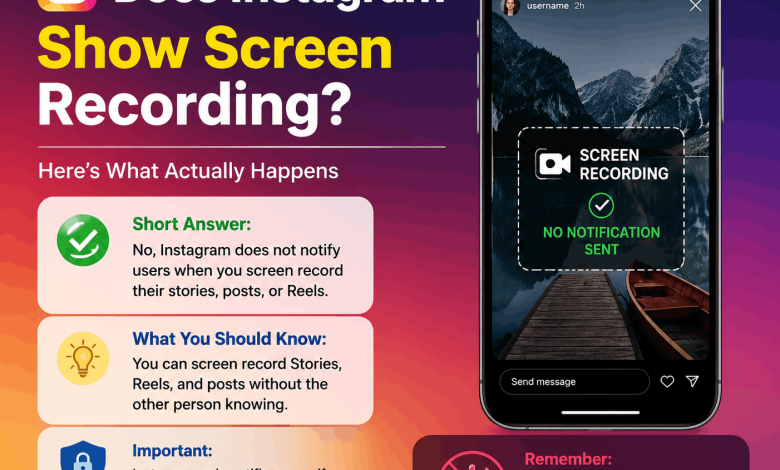
No. As of 2025, Instagram does not send a notification when you screen record someone’s Instagram Story.
This wasn’t always a settled question. Back in 2018, Instagram briefly tested a feature that would alert users when someone screenshotted their Story. That test ended quickly and never rolled out permanently. Since then, screen recording a Story — photo or video — produces zero notification to the account owner.
So if you’ve been wondering whether a friend got a ping when you recorded their vacation highlight: no, they had no idea. This applies to public accounts, private accounts, and Stories from people you follow. The account owner sees no alert, no badge, and no record of who recorded their Story.
Does Instagram Notify Screen Recording for Posts and Reels?
No notification goes out for screen recording a regular Instagram post or a Reel, either.
You can open someone’s photo post, hit screen record, and scroll through it, and Instagram won’t detect or report that action. Same with Reels — whether it’s a 15-second clip or a full-minute video, the creator gets no alert.
That’s good news for most people, since recording Reels to rewatch later or share offline is something millions of people do every day. Instagram simply doesn’t flag it.
One clarification worth making: if you share a Reel using the in-app share button, the creator may see engagement metrics like shares. That’s different from a screen recording — screen recording leaves no trace inside Instagram’s system.
Does Instagram Show Screen Recording in Direct Messages?
This is where it gets more specific.
Regular DM conversations. For standard Instagram DMs — text messages, regular photos, or videos in a chat — Instagram does not notify the other person if you screen record the conversation.
Disappearing photos and videos in DMs. This is the one real exception. If someone sends a disappearing photo or video in a DM (the kind that vanishes after one or two views), Instagram does notify them if you screenshot or screen record it. A small notification appears in the chat thread letting the sender know it was captured. Instagram treats disappearing messages more like Snapchat-style content, where the sender has an expectation of privacy, so it flags any capture attempt. If you screen record a disappearing video in someone’s DMs, expect them to know.
Does Instagram Notify Screen Recording for Close Friends Stories?
No. Close Friends is a feature that lets users share Stories with a smaller, selected group, and you might assume that extra layer of privacy comes with extra protection. It doesn’t — the same rules apply. No notification goes out when you screen record a Close Friends Story.
The account owner can see who viewed their Close Friends Story, but not who recorded it. That information simply isn’t available anywhere in the app. So if a creator shared something exclusively with their inner circle and you recorded it, they’ll never find out through Instagram.
How Does This Compare to Other Platforms?
It helps to put Instagram’s approach in context. Snapchat is the most aggressive about this — it alerts the sender whenever you screenshot or screen record a Snap or Snap Story, and always has.
Instagram has never gone that far, aside from the brief 2018 test and the current rule around disappearing DMs. TikTok, YouTube, and Facebook don’t notify creators about screen recording either, so Instagram’s approach actually lines up with the broader industry standard rather than Snapchat’s model.
What About Third-Party Screen Recording Apps?
Some people assume a third-party screen recorder might slip past Instagram’s detection. In practice, Instagram’s notification system where it exists at all is tied to its own in-app detection, not your device’s native recorder.
For disappearing DMs, Instagram can often still detect the capture even with a third-party screen recorder, though behavior can vary by device and OS, so don’t count on it as a reliable bypass. For everything else Stories, posts, Reels there’s nothing to bypass in the first place, because Instagram isn’t checking at all.
Can You Protect Your Own Content From Being Screen Recorded?
If you’re a creator worried about people saving your content without permission, Instagram doesn’t offer a built-in way to block screen recording. A few practical options instead:
- Use Close Friends to limit who sees sensitive Stories, keeping in mind recording is still technically possible
- Avoid posting anything to Stories or Reels you wouldn’t want saved permanently
- Lean on disappearing DMs for private content, since that’s the one place Instagram actually notifies you of a capture
- Watermark your content before posting so any recorded copy still carries your identity
There’s no way to block screen recording at the app level — that’s a limitation of how mobile operating systems work in general. Apps generally can’t stop a user from recording their own screen.
A Quick Look at Instagram’s Screen Recording History
Instagram’s notification policies have shifted over time, and the timeline is short. In 2018, Instagram ran a brief test notifying users when someone screenshotted their Story. It got picked up quickly by tech news outlets, caused a stir, and was quietly dropped without ever becoming permanent.
The one notification feature that did stick around is for disappearing DMs, which has been in place for years and remains active today. Outside of that, Instagram has moved away from aggressive capture-notification policies, leaning more toward creator and monetization tools than surveillance-style alerts.
Frequently Asked Questions About Instagram and Screen Recording
Does Instagram notify when you screen record a Story?
No. Instagram doesn’t notify anyone when you screen record their Story, including Stories from private accounts. The 2018 screenshot-notification test was scrapped and never became permanent.
If you screen record someone’s Instagram Story, will they know?
Not through Instagram. No alert or indicator is sent to the account owner. They can see who viewed their Story, but not who recorded it.
Does Instagram notify screen recording for Close Friends Stories?
No. Close Friends Stories get no special protection here — the creator can see who viewed it, but recording generates no notification.
Does Instagram tell you when someone screen records a DM?
For regular DM conversations, no. For disappearing photos or videos sent in a DM, yes — Instagram notifies the sender that the content was captured.
Does Instagram notify screen recording for Reels?
No. Screen recording a Reel produces no notification, and the creator has no way to know through Instagram that it happened.
Does a third-party screen recording app bypass Instagram’s detection?
For Stories, there’s nothing to bypass since Instagram doesn’t flag screen recording at all. For disappearing DMs, detection can still occur depending on your device, even with a third-party recorder.
Has Instagram ever notified users about Story screenshots?
Briefly. In 2018, Instagram tested screenshot notifications for Stories. The test ended quickly and was never officially launched.
Can someone tell if I saved their Instagram post by screen recording?
No. Creators can see likes, comments, shares, and in-app saves, but Instagram gives them no data about screen recordings.
Is screen recording on Instagram against the rules?
Instagram’s Terms of Use restrict using content in ways that violate someone’s rights or reproduce it without permission, but the act of screen recording itself isn’t blocked by the app. Using recorded content commercially or without credit can raise separate copyright issues.
What You Should Know Before You Hit Record
Instagram doesn’t notify screen recording in most situations. Stories, posts, Reels, and regular DMs can all be recorded without the other person finding out through the app. The one real exception is disappearing messages in DMs, where Instagram actively notifies the sender.
If you’re a creator looking to protect your content, watermarking and keeping sensitive material to disappearing DMs are your most practical options.
Want to know more about how Instagram works behind the scenes? Check out related guides on reuterings.com covering Instagram privacy settings, how Instagram’s algorithm ranks Stories, and what data Instagram collects about your activity.