Your cousin just got a PS5. You’re on Xbox. Your little sister only has an iPad. Somebody in the group chat asks, “can we all play Minecraft together?” and the answer isn’t a simple yes or no. Minecraft crossplay is real, and millions of players use it every day, but it only works if you know which version of the game you’re running.
This guide breaks down exactly how minecraft cross play works in 2026, which platforms talk to each other, how to turn it on step by step, and where to find active crossplay servers worth joining tonight.
Is Minecraft Crossplay in 2026? The Quick Answer
Yes, but with a catch. If everyone in your group owns Minecraft Bedrock Edition, crossplay works right out of the box between Windows, Xbox, PlayStation, Nintendo Switch, iOS, and Android. Sign in with a Microsoft account, add a friend, and you’re in the same world within a couple of minutes.
Java Edition tells a different story. It’s PC-only, and it stays in its own multiplayer bubble unless a server operator installs bridging software. So can you play minecraft cross platform? On Bedrock, without question. On Java, only through a workaround, which we’ll cover below.
Java Edition vs Bedrock Edition: Why Crossplay Isn’t Universal
Minecraft isn’t one game built for every screen. It’s two separate codebases that happen to share a name, and that split is the real reason crossplay minecraft confuses so many players.
Java Edition
Java is the original 2011 release, built in the Java programming language, and it only runs on Windows, macOS, and Linux. Its biggest draw is the modding scene: Forge, Fabric, and NeoForge give players fifteen-plus years of custom content, from tiny tweaks to full overhauls. That depth comes at a cost. Java’s multiplayer network is closed off from every console and mobile player.
Bedrock Edition
Bedrock is written in C++ and runs on Windows 10/11, Xbox, PlayStation, Nintendo Switch, iOS, and Android from one shared codebase. That shared foundation is exactly what makes cross play minecraft possible on this side of the game. Redstone behaves a little differently, some commands work differently, and mod support is nowhere near Java’s level, but every Bedrock player, no matter the device, drops into the same friends list and the same servers.
Buy Minecraft through Steam and you get Java. Buy it on a console, phone, or through the Microsoft Store on PC, and you get Bedrock. If you’re not sure which one you own, check Settings inside the game. Bedrock shows a Store tab and Realms option; Java doesn’t.
Which Platforms Support Minecraft Crossplay
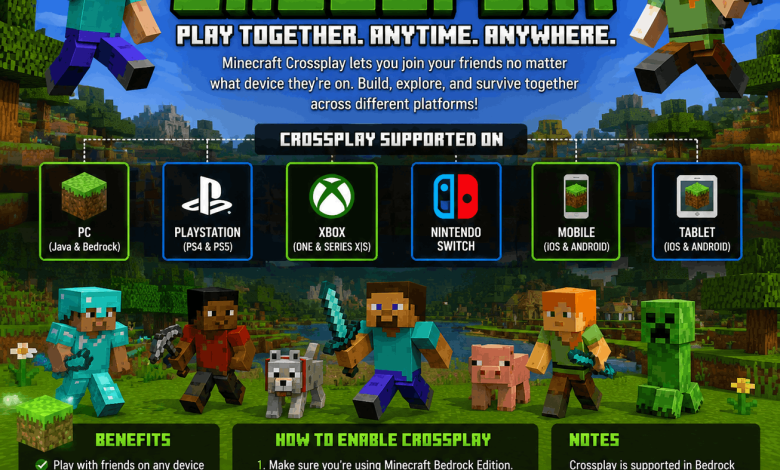
Here’s the current breakdown for Bedrock Edition, the version that carries nearly all crossplay traffic:
- Windows 10 and 11 (Bedrock, through the Microsoft Store, not Steam)
- Xbox One and Xbox Series X|S
- PlayStation 4 and PlayStation 5
- Nintendo Switch and Switch 2
- iOS (iPhone and iPad)
- Android phones and tablets
All six platforms share one multiplayer pool. A player on a Switch, a player on a PS5, and a player on an old Android tablet can build in the same world without anyone downloading anything extra. Java Edition sits apart from this list entirely, connecting only to other Java installations on PC.
How to Enable Minecraft Crossplay
Getting crossplay running takes a few minutes the first time and seconds after that. Follow these steps on any Bedrock device:
- Sign in with a Microsoft account. Open Minecraft, go to Settings, and sign in. Xbox players are signed in automatically; PlayStation, Switch, and mobile players need to link an account the first time they launch the game.
- Turn on crossplay in your console settings. PlayStation buries this under Account Management, so check there specifically if friends can’t see your world.
- Add friends by Gamertag, not display name. Open the Friends tab inside Minecraft (not your console’s native friends list) and search by Xbox Gamertag. Every platform uses this same tag system.
- Match your game version. Go to Settings, then About, and compare version numbers with your friend. Mismatched versions throw an “Outdated Client” or “Outdated Server” error and block the connection.
- Turn on Multiplayer in your world settings. Open the world, flip Multiplayer Game to On, and your friends can join through the Friends tab or a direct invite.
- Open the right ports if you’re hosting a dedicated server. Bedrock uses UDP 19132; Java uses TCP 25565.
Once your friend’s Gamertag shows an active world in the Friends tab, hit Join World and you’re playing together, no IP address needed for private games.
Can Java and Bedrock Players Play Together?
Not natively, no. Mojang runs Java and Bedrock on separate codebases with separate world formats, packet formats, and even different command syntax, and there’s no public roadmap to merge them. The mod ecosystem on Java and the certification requirements on console Bedrock make that unlikely to change soon.
There’s a practical workaround, though: GeyserMC. It’s a free plugin that server owners install on a Java server, translating the Bedrock protocol so console and mobile players can connect to what is technically a Java world. Pair it with Floodgate and Bedrock players don’t even need a Java-owned Microsoft account to join. This only flows one direction. A Java client still can’t connect to a pure Bedrock world; the bridge only works when Geyser sits on the Java server side.
If you’re renting server space and want both editions in one lobby, look for hosting that lists Geyser-ready setups. Most modern Minecraft hosting panels offer a one-click install for it now.
Best Minecraft Servers to Join for Crossplay
Once you’ve got crossplay working with friends, jumping into a public server opens up a much bigger playerbase. These are active, well-established options worth trying:
Hypixel (mc.hypixel.net) – The largest Minecraft network in the world, running Java natively with Geyser support that lets Bedrock players connect too. BedWars, SkyBlock, and dozens of minigames live here, with peak counts that regularly top 100,000 players.
CubeCraft (play.cubecraft.net) – Genuine crossplay between Java and Bedrock in the same lobbies. EggWars and Lucky Islands are the signature modes, and it’s pre-loaded in Bedrock’s featured server list, so console and mobile players can join with zero setup.
The Hive (play.hivemc.com) – A Bedrock-first network with Hide and Seek, Treasure Wars, and Block Drop. Also pre-loaded on console and mobile, making it one of the easiest crossplay servers to find.
NetherGames (play.nethergames.org) – Bedrock-only, with BedWars, Murder Mystery, and a strong creative mode community.
Mineplex – Another of the original Mojang-featured Bedrock servers, preloaded on console and mobile with a long-running minigame lineup.
Server IPs shift occasionally, so double-check the server’s official website or Discord if a connection fails. Featured servers preloaded in Bedrock’s Servers tab are the safest starting point, since you don’t have to type an address at all.
Common Minecraft Crossplay Problems and Fixes
Version mismatch causes most connection failures. If a friend can’t join your world, check Settings, then About on both devices, and confirm you’re running the same content drop before touching anything else.
NAT type issues block invites more often on consoles than PC. Rebooting your router or turning on UPnP usually clears this up. If your friend simply isn’t appearing in your Friends tab at all, confirm they’ve signed into a Microsoft account and that you’ve actually added each other by Gamertag rather than a platform-native friend request.
Realms subscriptions solve a lot of this friction automatically, since a Realm stays online around the clock and handles crossplay invites without port forwarding or manual server setup.
Frequently Asked Questions About Minecraft Crossplay
Is Minecraft crossplay free?
Yes, crossplay itself doesn’t cost anything extra. You need a free Microsoft account and a copy of Minecraft Bedrock Edition on each device, but Mojang doesn’t charge separately for cross-platform play.
Can Xbox and PS5 players play Minecraft together?
Yes. Both run Bedrock Edition, so as long as everyone signs into a Microsoft account and adds each other by Gamertag, Xbox and PlayStation 5 players share the same worlds and servers with no extra steps.
Does Minecraft Java support crossplay with consoles?
Not on its own. Java only connects to other Java installations on PC. Console and mobile players can join a Java server only if that server’s owner installs GeyserMC to bridge the two editions.
How do I know if I own Java or Bedrock?
Bought on Steam means Java. Bought on console, mobile, or through the Microsoft Store on PC means Bedrock. Inside the game, Bedrock shows a Store tab and Realms option that Java doesn’t have.
Why can’t my friend join my Minecraft world?
The most common cause is a version mismatch between your devices. Check Settings, then About, on both, and update whichever one is behind. NAT settings on consoles and an inactive Multiplayer toggle in your world settings cause most of the rest.
Does Minecraft crossplay work on mobile?
Yes. iOS and Android both run Bedrock Edition and connect fully with Windows, Xbox, PlayStation, and Switch players, using the same Microsoft account and Gamertag friend system as every other Bedrock platform.
What ports does Minecraft crossplay use?
Bedrock servers use UDP port 19132. Java servers use TCP port 25565. If you’re hosting your own dedicated server and friends can’t connect, confirming these ports are open is a good first troubleshooting step.
Can Nintendo Switch play with PC players?
Yes, as long as the PC player owns Bedrock Edition through the Microsoft Store rather than Java through Steam. Both sign in with a Microsoft account and add each other by Gamertag like any other Bedrock pairing.
Get Your Friends Into the Same World Tonight
Crossplay comes down to one decision: get everyone on Bedrock Edition, and the rest is a Microsoft account and a Gamertag away. Java stays the pick for PC players chasing deep mods, but it trades away that cross-device flexibility.
Once you’re connected, taming animals together is a natural next step for a shared survival world, and our guide on the best Minecraft enchantment order will get your gear ready before you head into a PvP-focused crossplay server like CubeCraft or The Hive.