You just opened your mailbox and found your new AvantCard, and now you want to activate it, check your balance, or set up your first payment. Or maybe you’ve had the card for months and suddenly your password won’t work. Either way, the Avant login process is the gateway to everything: your statements, your due dates, your credit line, and your account settings.
This guide walks you through every part of the Avant login experience, from the very first sign-in to what to do when the app throws an error. You’ll also find real answers to the questions people search for most, along with a few things Avant’s own help pages don’t spell out clearly.
What Is Avant and Who Issues the AvantCard
Avant is a fintech company that offers personal loans and a credit card product called AvantCard. The credit card itself is issued by WebBank, a Utah-chartered bank, while Avant handles the servicing, app, and customer experience.
This distinction matters for one practical reason: if you ever see “WebBank” on a statement or in fine print, that’s not an error. It’s the actual bank behind your account, and Avant is the brand you interact with day to day.
AvantCard is built for people who are working on their credit, not necessarily those with excellent scores already. That’s reflected in the sign-in process too, since Avant leans on identity checks like the last four digits of your Social Security number during activation, a step you won’t see with many traditional bank cards.
How to Log In to Your Avant Account
Logging in only takes a minute once you know where to go. Here’s the process from start to finish.
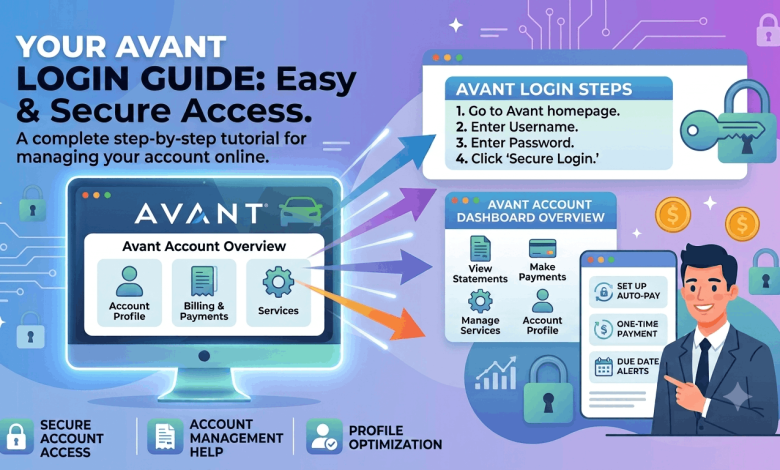
- Go to the official Avant customer dashboard at avant.com/card, or open the Avant mobile app if you already have it installed.
- Enter the email address you used when you applied for the card.
- Type in your password in the field below it.
- Tap or click “Log In” to reach your dashboard.
Once you’re in, your dashboard shows your current balance, your minimum payment, your due date, and recent transactions all on one screen. From there you can pay your bill, download statements, update your contact information, or turn on autopay.
Logging In on the Avant Mobile App
The Avant app mirrors the desktop dashboard almost exactly, and it’s genuinely handy for a quick balance check between errands. Download it from the App Store or Google Play, sign in with the same email and password you use on the website, and you’re set.
One thing worth knowing: some Android users reported login trouble in mid-2026 after an app update, including repeated CAPTCHA prompts and broken biometric sign-in. Avant addressed the issue, but if your fingerprint or face unlock stops working, updating to the latest app version usually clears it up.
How to Activate Your AvantCard for the First Time
A brand-new AvantCard needs to be activated before it works, and the process is tied directly into your first login.
- Visit your customer dashboard at avant.com/card.
- Sign in using the email address on file and the password you created during your application.
- Enter the last four digits of your Social Security number along with the last four digits of your new AvantCard.
- Confirm the details, and your card activates instantly.
If you’d rather skip the online steps, you can activate by phone instead at 1-855-752-7011. Either method gets your card ready to use right away, and the dashboard will also prompt you to set up paperless statements and autopay if you want them.
What to Do If You Can’t Remember Your Password
Forgetting a password happens to everyone, and Avant’s reset process is straightforward:
- Go to the Avant login page and look for the link that says “Don’t remember your password?”
- Enter the email address tied to your account.
- Check your inbox for a reset link and follow the instructions inside it.
- Choose a new password and log back in.
If the reset email never arrives, check your spam folder first. If it’s still missing after that, calling customer service directly is faster than waiting.
When to Call Avant Support Instead of Resetting Online
Sometimes a password reset won’t fix the real problem, especially if your email address changed since you applied or your account got locked after too many failed attempts. In those cases, contact Avant customer service at (855) 752-7012 or (855) 752-7011. A representative can verify your identity and manually restore access, which the automated reset flow can’t always do on its own.
How to Make a Payment After You Log In
Once you’re signed in, paying your AvantCard bill takes just a few clicks:
- From your dashboard, select the payment option, usually labeled “Make a Payment.”
- Choose the linked bank account you want to pay from, or add a new one.
- Enter the amount, whether that’s the minimum due, the statement balance, or a custom amount.
- Pick your payment date and confirm.
Autopay is worth turning on if you tend to forget due dates. You can set it to cover the minimum payment or the full statement balance each cycle, and you can turn it off anytime from the same settings menu.
Checking Your Balance Without Fully Logging In
You don’t always need the full dashboard just to know where you stand. Avant gives you two shortcuts:
- Online: Log in and your current balance appears right on the home screen, no extra clicks needed.
- By phone: Call (855) 752-7012 and follow the automated prompts to hear your balance read back to you, no login required at all.
This second option is useful if you’re locked out temporarily and just need a quick number before you sort out your password.
Common Avant Login Problems and How to Fix Them
Most login issues fall into a handful of categories, and knowing which one you’re dealing with saves time.
Wrong email on file. If you changed email addresses after applying and never updated Avant, your old login won’t work. Call support to update your contact information before trying to reset your password.
Browser or app glitches. Clearing your browser cache, trying a different browser, or updating the app to its latest version resolves a surprising number of “it just won’t load” complaints.
Too many failed attempts. Repeated wrong passwords can temporarily lock your account as a security measure. Wait a short period, then try the reset link rather than guessing again.
Biometric login failures on mobile. If fingerprint or face unlock stops working in the app, sign in manually with your email and password once, then re-enable biometrics from the app’s security settings.
Avant Login at a Glance
| Task | Where to Do It | What You’ll Need |
| First-time login | avant.com/card or the Avant app | Email and password from your application |
| Card activation | avant.com/card | Email, password, last 4 of SSN, last 4 of card number |
| Password reset | Avant login page | Access to the email on file |
| Balance check by phone | (855) 752-7012 | Your account phone number or card details |
| Account help | (855) 752-7011 or (855) 752-7012 | Identity verification questions |
Frequently Asked Questions About Avant Login
How do I log in to my Avant credit card account?
Go to avant.com/card or open the Avant app, enter the email address and password you used when you applied, and select “Log In.” Your dashboard will show your balance, due date, and recent activity immediately.
What is AvantCard login used for besides paying my bill?
Beyond payments, the AvantCard login gives you access to statements, transaction history, credit line details, autopay settings, and your personal contact information. You can also use it to activate a new card or request a replacement.
Why can’t I log in to my Avant account?
The most common causes are an outdated email address on file, an outdated app version, or too many failed password attempts triggering a temporary lock. Try the password reset link first, and call (855) 752-7012 if that doesn’t resolve it.
Is Avant and AvantCard the same company?
Avant is the fintech brand you interact with through the app and dashboard, but the actual credit card is issued by WebBank. Avant handles servicing, support, and the online experience, while WebBank is the regulated bank behind the account.
How do I reset my Avant login password?
Click “Don’t remember your password?” on the Avant login page, enter your email address, and follow the reset link sent to your inbox. If you never receive the email, check your spam folder or call customer service directly.
Can I check my Avant balance without logging in?
Yes. Call (855) 752-7012 and follow the automated prompts to have your current balance read to you without needing your password at all.
How do I activate my AvantCard for the first time?
Sign in at avant.com/card with your email and password, then enter the last four digits of your Social Security number and the last four digits of your card. Your card activates instantly once those details are confirmed.
Does the Avant app work the same as the website?
Yes, the app mirrors the dashboard’s core features, including balance checks, payments, and statement access. Some users have reported temporary login bugs after app updates, which are usually fixed by installing the latest version.
What number do I call for Avant login help?
Customer service can be reached at (855) 752-7012 for general account questions or (855) 752-7011 for card activation specifically. Both lines can verify your identity and help restore access manually.
Is it safe to save my Avant login on my phone?
Using your phone’s built-in password manager or the app’s biometric login is generally safe, since it relies on your device’s own security rather than storing the password in plain text. Just make sure your phone itself is locked with a passcode or biometric as a backup layer.
Get Back Into Your Account and Stay on Top of Payments
Logging in to Avant only takes an email, a password, and a few seconds once your account is set up correctly. Activation, payments, and balance checks all flow through that same simple login, and most sign-in problems come down to an outdated email or a password reset away from being fixed.
If you’re still building your credit profile, check out our guides on improving your credit score and comparing secured versus unsecured credit cards for your next move. And if payment scheduling is on your mind, our piece on setting up autopay across different card issuers walks through the same steps for accounts beyond AvantCard.