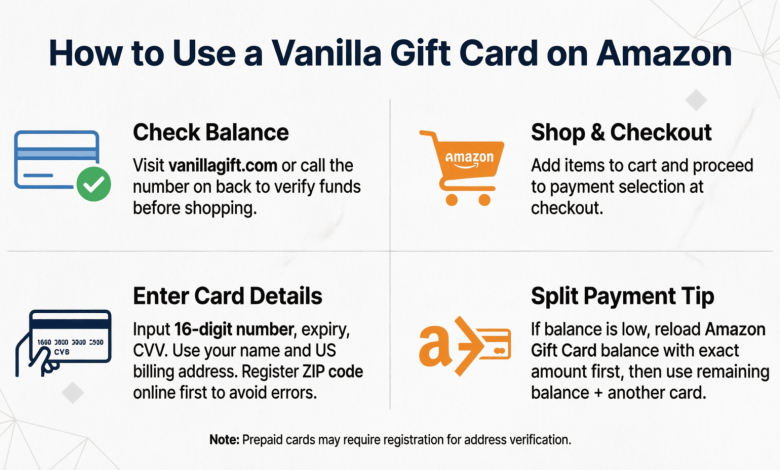
If you’ve ever tried to pay for an Amazon order with a Vanilla gift card and watched it get rejected at checkout, you’re not imagining things. Amazon doesn’t accept prepaid Visa or Mastercard-style cards like Vanilla the same way it accepts its own gift cards, and that trips up a lot of shoppers. This guide walks through how to use a Vanilla gift card on Amazon, why the direct route often fails, and the workarounds that actually get your balance spent.
Quick Answer: You can’t add a Vanilla gift card directly as an Amazon payment method in most cases. Instead, register the card with a matching billing address, then convert the balance into an Amazon gift card through Amazon’s reload page, or use it at checkout alongside a backup payment method to cover any shortfall.
By the end of this, you’ll know exactly why these cards get declined, the step-by-step process that works, and what to do when Amazon still won’t take it.
Why Vanilla Gift Cards Don’t Work Directly on Amazon
Vanilla gift cards are prepaid Visa or Mastercard products, not Amazon-branded gift cards, and Amazon’s checkout system treats the two very differently. Amazon gift cards load straight into your account balance. Prepaid cards get processed like a bank card, which means they run into verification checks that a closed-loop gift card never faces.
The Billing Address Mismatch Problem
Most declines come down to address verification. When you buy a Vanilla card in a store, it usually isn’t registered to any name or address, so when Amazon’s payment system checks the card against the billing information on your account, there’s nothing to match. Registering the card with a real address before you shop fixes this in most cases.
Why Amazon Treats Prepaid Cards Differently Than Amazon Gift Cards
Amazon gift cards carry a code tied to your account and never touch the bank card processing network. A Vanilla card runs through Visa or Mastercard’s payment rails, so Amazon has to verify it the same way it verifies a debit or credit card, including the billing zip code, name, and sometimes the CVV. Any mismatch, and the order gets flagged or declined outright.
How to Use a Vanilla Gift Card on Amazon Step by Step
There’s a reliable order of operations here: register the card, convert it, then apply it. Skipping the registration step is the single biggest reason these cards fail at checkout.
Registering Your Card and Setting a Billing Address
- Flip the card over and find the activation or registration website printed on the back (usually myvanilla.com or a similar prepaid portal).
- Enter the 16-digit card number, expiration date, and security code.
- Set a billing address. Use your real home address, even if the card was a gift, since this address needs to match what’s on file wherever you plan to spend it.
- Save the confirmation. Some portals take a few hours to activate the address on the card.
Converting the Balance to an Amazon Gift Card
Amazon has a reload page that lets you buy an Amazon gift card balance using another card as the payment method. This is the workaround that sidesteps most decline issues entirely.
- Go to Amazon’s “Reload Your Balance” page from your account settings.
- Choose the amount matching your Vanilla card balance, down to the cent if you can check it first.
- Enter the Vanilla card as the payment method, using the same billing address you registered.
- Confirm the purchase. The dollar amount now sits in your Amazon gift card balance instead of on the prepaid card.
Applying the Balance at Checkout
Once the funds are in your Amazon gift card balance, checkout is simple. Amazon pulls from that balance automatically before charging any other payment method on file, so you don’t need to do anything extra at the point of sale.
What to Do If Your Vanilla Gift Card Is Declined
A decline doesn’t mean the balance is gone. It usually means Amazon’s verification step failed, and there are a couple of fixes worth trying before giving up on the card.
Double-Checking the Card Balance
Call the number on the back of the card or check the registration portal to confirm the exact remaining balance. Small purchases sometimes leave a card with an odd amount like $4.37, and trying to charge more than that will always fail.
Combining It With Another Payment Method
Amazon generally won’t let you split a single order across a Vanilla card and a credit card at checkout the way you can with two Amazon gift cards. The reliable path is still converting the exact remaining balance to an Amazon gift card first, then letting Amazon combine that gift card balance with a backup card automatically for anything left over.
Common Mistakes When Using a Vanilla Gift Card on Amazon
- Skipping registration and trying to use the card with no billing address on file
- Guessing at the balance instead of confirming it before checkout
- Entering a billing address that doesn’t match the one registered to the card
- Trying to use the card for a subscription or recurring payment, which Amazon generally blocks for prepaid cards
- Assuming a decline means the balance is lost, when it usually just means the payment method needs to be added a different way
| Method | Best For | Typical Success Rate | What You Need |
| Direct checkout entry | Cards already registered with a matching address | Low to moderate | Exact billing address match |
| Reload to Amazon gift card balance | Almost any Vanilla card, including partially spent ones | High | Registered card, known balance |
| Phone activation then retry | Cards that fail online registration | Moderate | Number on back of card |
Frequently Asked Questions
Why won’t Amazon accept my Vanilla gift card?
Amazon usually declines Vanilla gift cards because the billing address on the card doesn’t match what’s stored in your Amazon account. Registering the card with a real address at the issuer’s website before checkout resolves this in most cases.
Can I use a Vanilla gift card and a credit card on the same Amazon order?
Not directly through the card entry screen, but you can convert the Vanilla balance into an Amazon gift card first, and Amazon will automatically apply that balance alongside a credit card at checkout. This is the most dependable way to split payment across two sources.
How do I check my Vanilla gift card balance?
Call the toll-free number printed on the back of the card or log in to the registration website where you activated it. Always confirm the exact balance before trying to spend it, since guessing the amount often causes declines.
Does registering a Vanilla gift card cost anything?
No, registering the card and setting a billing address is free through the issuer’s website. Some cards do carry inactivity fees after a period of non-use, so it’s worth spending the balance sooner rather than later.
Can I use a Vanilla gift card for an Amazon subscription like Prime?
Generally no. Amazon typically requires a standard credit or debit card for recurring subscription charges and won’t accept a prepaid card for that purpose, even after registration.
What happens if my Vanilla gift card balance doesn’t cover the full order?
If the balance is still on the physical card, the order will likely fail unless the amount matches exactly. Converting the remaining balance into an Amazon gift card lets Amazon apply it as partial payment and charge a backup card for the rest.
Is it safe to enter my Vanilla gift card information on Amazon?
Yes, entering the card details directly on Amazon.com or through the official reload page is safe, since Amazon processes it the same way it processes any other card. The main risk is scam sites impersonating Amazon’s gift card page, so always check the URL before entering card details.
Why does my Vanilla gift card work in stores but not on Amazon?
In-store terminals often skip the address verification step that online retailers use, which is why the card can work at a physical checkout but fail online. Registering the card with a billing address closes that gap for online purchases.
Can I use a Vanilla gift card to buy another gift card on Amazon?
Yes, this is essentially what the reload process does. You’re using the Vanilla card as payment to purchase Amazon gift card balance, which then behaves like any other Amazon gift card at checkout.
What if my Vanilla gift card is expired but still has a balance?
Most Vanilla cards have a fixed expiration date printed on the front, after which the balance is typically forfeited, though some issuers offer a card replacement process for a fee. Check the terms on the back of the card or the issuer’s website before assuming the funds are lost.