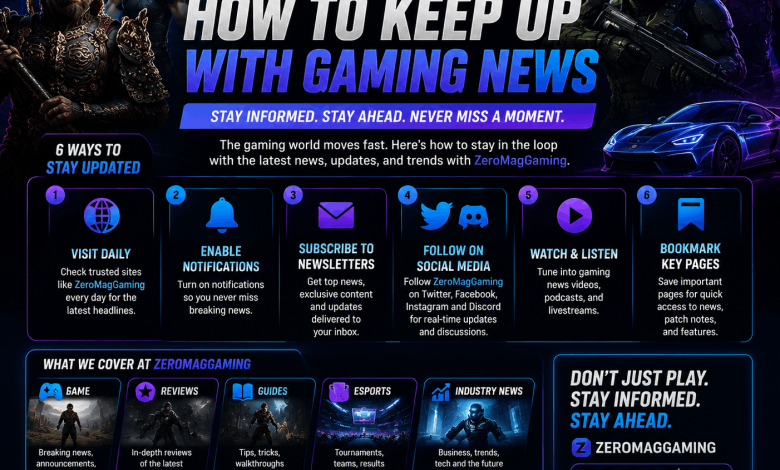
You check your phone, scroll past three trailers you missed, a patch note thread you didn’t see, and a leak everyone already argued about last night. That feeling of being a week behind your own hobby is common, and it’s fixable. Learning how to keep up with gaming news doesn’t mean refreshing ten tabs all day. It means picking the right sources and letting them come to you.
This guide walks through the sources that actually work in 2026, how to filter out noise, and how to build a system that fits your schedule instead of eating it.
Start With a Small Core of Trusted News Sites
Big outlets still carry the weight when it comes to speed and accuracy. IGN, GameSpot, Polygon, and GameRant post fast, and their reporting on release dates, reviews, and patch notes tends to hold up.
Pick two or three sites you trust and bookmark their news pages instead of trying to read everything from every outlet. Smaller, focused hubs and aggregators such as Zeromaggaming round up daily headlines in one place, which cuts down on the number of tabs you need open. That combination, a couple of major outlets plus one aggregator, covers most of what a typical player needs.
Set Up News Alerts Instead of Checking Manually
Most gaming sites and apps let you turn on push notifications for specific tags: a console, a franchise, or a publisher. Turn these on for the two or three franchises you actually care about and skip the rest. Blanket notifications from every category will bury the updates that matter.
Use Newsletters for the Weekly Roundup
Newsletters solve a real problem: they compress a week of scattered posts into one email you read over coffee. Sign up for one general industry newsletter and one console-specific option if you’re loyal to a platform.
Most of these arrive weekly and include release calendars, patch summaries, and short takes on rumors worth watching. They won’t replace real-time news, but they catch anything you missed during a busy week, and they’re free.
Follow Developers and Publishers Directly on Social Media
Studios often post announcements straight to X, Instagram, or Bluesky before any outlet writes about them. Following the official accounts for your favorite studios puts that information in front of you first, without a middleman.
Watch for verified badges and cross-check big claims against a second source before you treat a screenshot as fact. Fake announcement graphics circulate constantly around big events like Summer Game Fest and the various console showcases, and even seasoned fans get fooled.
Join Reddit and Discord Communities
Subreddits like r/Games and r/GamingLeaksAndRumours move fast, and franchise-specific Discord servers often have community members who pull developer posts and translate them within minutes. These spaces are also where you’ll see genuine player reaction, not just marketing copy.
Treat leaks from these communities as unconfirmed until an outlet or the developer verifies them. Rumors spread quickly and not all of them hold up.
Watch Gaming Events and Showcases Live
A handful of dates on the calendar shape most of the year’s biggest news: Summer Game Fest, the Xbox Games Showcase, Nintendo Direct broadcasts, and State of Play events from PlayStation. These streams are where major reveals, release dates, and trailers land first, and watching live means you get the news without waiting for a recap article.
Mark these dates ahead of time. Most outlets publish an events calendar a few months out, and following one or two on social media guarantees you’ll see the announcement the moment the schedule drops.
Follow Streamers and YouTube Creators for Context
News sites tell you what happened. Creators show you what it looks like. Watching a trusted streamer’s first playthrough or a YouTuber’s breakdown of a patch gives you a feel for a game that a headline can’t.
Pick creators who play the genres you like and who explain their reasoning rather than just reacting. Over time, their taste becomes a filter that saves you from wasting money on hyped games that don’t match what you actually enjoy.
Build an RSS Feed for a Cleaner, Faster Overview
RSS feels old school, but it still works better than most social feeds for pure news consumption. Tools like Feedly let you pull headlines from every site you follow into one clean list, sorted by time, with no algorithm deciding what you see.
Add your two or three core news sites, one aggregator, and any official developer blogs you care about. Five minutes scrolling a feed reader in the morning covers more ground than an hour of scattered app checking.
Download a Gaming News App for Push Alerts on the Go
Apps built specifically for gaming news, including the mobile apps from IGN and GameSpot, let you customize alerts by platform and franchise. This puts control in your hands instead of forcing you to sort through a general feed.
Turn off notifications for categories outside your interests during setup. A cluttered notification tray is the fastest way to start ignoring your phone’s alerts altogether, which defeats the purpose.
Learn to Spot Reliable Leaks From Noise
This is the part most guides skip, and it’s the part that actually matters once you have your sources set up. Not every rumor account deserves your trust, and treating all leaks equally leads to disappointment when a “confirmed” release date turns out to be fan speculation.
A few habits help:
- Check the leaker’s track record. Accounts with a history of accurate calls, like known insiders covering specific publishers, are worth more weight than anonymous new accounts.
- Wait for a second independent source before sharing or acting on a leak.
- Be skeptical of leaks tied to giveaways, surveys, or clickbait titles asking you to “find out the shocking truth.”
- Remember that publishers sometimes plant fake leaks on purpose to test reactions or throw off datamine-related news.
Frequently Asked Questions About How to Keep Up With Gaming News
What is the best way to stay updated on new game releases?
The best approach combines two or three trusted news sites, one newsletter, and alerts on social media for the specific developers and franchises you follow. This spreads your sources without overwhelming your schedule, and it means big announcements reach you from more than one direction.
How do I find out about video game news without checking multiple sites every day?
Use an RSS reader like Feedly or a gaming news aggregator app that pulls headlines from your chosen sources into one feed. A five minute scroll each morning replaces the need to visit each site separately.
Are gaming leaks usually accurate?
Leak accuracy depends entirely on the source. Established insiders with a proven track record are often correct, while random social accounts guessing at release windows frequently aren’t. Wait for a second source before treating any leak as confirmed.
What are the biggest gaming events to watch for news each year?
Summer Game Fest, the Xbox Games Showcase, PlayStation’s State of Play, and Nintendo Direct broadcasts consistently produce the year’s biggest reveals. Following the official channels for these events ahead of time ensures you catch announcements the moment they happen.
Should I follow game developers on social media?
Yes, following official studio and developer accounts puts announcements in front of you before most news outlets publish their coverage. Just verify major claims against a second source, since fake announcement graphics do circulate.
How often does gaming news actually change?
Major news breaks daily, with release dates, patches, and trailers dropping throughout the week, while the biggest reveals cluster around scheduled showcases. A weekly newsletter combined with daily alerts on a couple of key franchises covers both the steady stream and the big moments.
What’s the difference between a gaming news site and a gaming aggregator?
A news site produces its own original reporting and reviews, while an aggregator like Zeromaggaming collects headlines from multiple outlets into one place. Using both gives you original reporting plus a quick daily overview without visiting every source individually.
Do I need to pay for gaming news services?
No, the sources that matter most, including newsletters, RSS feeds, social media, and most news apps, are free. Paid options exist for ad-free reading or print magazines, but they’re optional rather than necessary.
Set Up Your System and Stop Missing the Announcements That Matter
A working setup comes down to three habits: a small core of trusted sites and newsletters, alerts limited to what you actually care about, and a healthy filter for unverified leaks. Set it up once, and staying current stops feeling like a chore.
If you’re gearing up for a specific console, check out our guides on the newest hardware releases, tips for finding the best gaming deals, and how to build a budget-friendly gaming setup for more ways to get the most out of your time on reuterings.com.