You typed in your password three times and your inbox still won’t open. That’s usually the moment people search for one and one webmail, hoping someone will just tell them where the real login page is and why their account keeps kicking them out. This guide covers that, plus the setup steps, mobile access, and security settings that most login tutorials skip entirely.
By the end, you’ll know exactly how to sign in, what to do when the login fails, and how to connect your account to your phone or a desktop email app like Outlook. No guesswork, no outdated screenshots from a version of the site that doesn’t exist anymore.
What Happened to 1&1 Webmail?
If you’ve used this email service for years, you might remember it under the name 1&1. The company rebranded to IONOS back in 2019, and the webmail platform moved with it. Your login credentials, mailbox, and folders didn’t change. Only the branding and, in some cases, the login URL did.
This is why so many people still search for webmail 1and1 mail or 1 and 1 webmail login even though the current interface says IONOS at the top. Both names point to the same service. If you set up your email years ago under the old 1&1 name, your account still works exactly the same way today.
How to Log In to One and One (IONOS) Webmail
Logging in takes less than a minute once you’re on the right page. Here’s the process from start to finish.
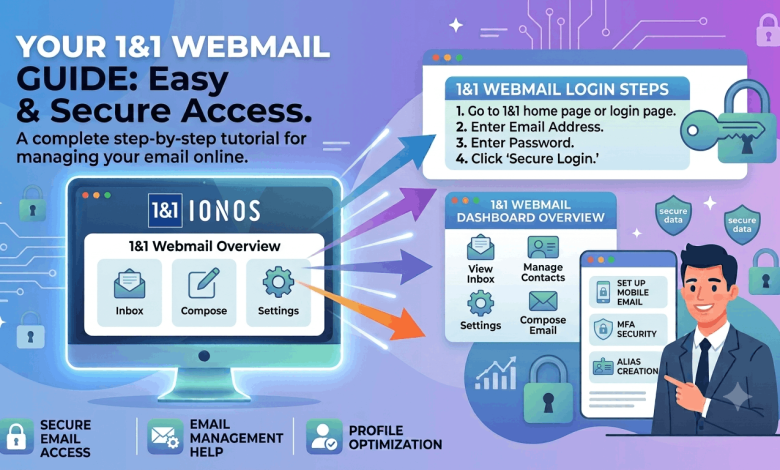
- Open your browser and go to webmail.ionos.com. Bookmark this page so you don’t have to search for it again.
- Enter your full email address in the username field. Not your customer ID, unless you’re specifically prompted for it.
- Type your password. Check for caps lock and autofill errors before you hit submit, since a stray space is one of the most common reasons logins fail.
- Click Log In. You’ll land directly in your inbox.
Some regions route through a slightly different portal at login.ionos.com, then redirect to webmail from there. If you’re outside the US, check that you’re on the correct regional domain (.co.uk, .fr, .de) instead of the .com version, since account regions are tied to where you originally signed up.
Logging In Through Your IONOS Account Dashboard
If you manage a domain or hosting plan with IONOS, you can also reach your inbox through the account dashboard instead of the direct webmail link.
- Sign in to your IONOS account at login.ionos.com.
- Find the Email tile on your dashboard.
- Select the mailbox you want to open.
- Click Open Webmail to load your inbox in a new tab.
This route is a bit slower, but it’s useful if you manage several email addresses under one account and want to switch between them without logging out each time.
Fixing Common One and One Webmail Login Problems
Most login failures come down to one of five causes. Here’s how to work through them in order.
You Forgot Your Password
Click Forgot Password? on the login page. You’ll need your registered email address or customer ID to start the reset. IONOS sends a reset link to a recovery email tied to your account, not the mailbox you’re locked out of, so check whichever address you listed when you signed up.
Your Browser Is Blocking the Login
Cookies need to be enabled for webmail to work, since the platform uses a cookie to keep you signed in for up to 30 days. Clear your cache, try a private or incognito window, or switch browsers entirely if the page hangs on load. An outdated browser version causes more login failures than people expect.
You’re Locked Out After Too Many Attempts
Five or six failed password attempts in a row will trigger a temporary lockout. Wait about 15 minutes before trying again rather than repeatedly refreshing the page, which can extend the lock in some cases.
You Typed the Wrong Address
A missing “@yourdomain.com” or a typo in the domain name is one of the most overlooked login issues. If you manage a custom domain through IONOS, your email address has to match that domain exactly, character for character.
The Server Is Down
Rare, but it happens. Check IONOS’s status page before assuming the problem is on your end.
Setting Up One and One Webmail on Your Phone or Desktop App
You don’t have to open a browser every time you want to check email. IONOS mailboxes work with Outlook, Apple Mail, Thunderbird, and the built-in mail apps on iOS and Android through standard IMAP or POP3 settings.
Use these settings when adding your account manually:
- Incoming mail server (IMAP): imap.ionos.com, port 993, SSL enabled
- Outgoing mail server (SMTP): smtp.ionos.com, port 465, SSL enabled
- Username: your full email address
- Password: your webmail password
If your outgoing mail refuses to send, your network might be blocking port 465. Switch the SMTP port to 587 with STARTTLS encryption instead, and that usually resolves it. This single fix solves more “email won’t send” tickets than any other setting change.
IMAP keeps your mail synced across every device, since messages stay on the server. POP3 downloads mail to a single device and removes it from the server by default, which is worth avoiding unless you have a specific reason to keep a local-only copy.
Securing Your One and One Webmail Account
A webmail account tied to your domain is often the recovery point for your website, your hosting plan, and any other services registered under that email. That makes it a bigger target than a typical personal inbox.
A few habits make a real difference:
- Use a password you haven’t reused anywhere else. Password managers make this painless.
- Turn on two-factor authentication in your IONOS account settings if it’s available on your plan.
- Check the sender address before clicking any link that asks you to “verify your account.” IONOS won’t ask for your password by email.
- Review your account activity periodically for logins you don’t recognize.
If you ever get an email claiming to be from IONOS asking you to log in through a link, type webmail.ionos.com into your browser manually instead of clicking through. That single habit blocks the majority of phishing attempts aimed at hosting and webmail accounts.
Webmail Features Worth Knowing About
Most guides stop at the login step and skip the tools sitting inside your inbox that make daily use faster.
Filters and rules let you sort incoming mail automatically, so newsletters, invoices, or client emails land in their own folders instead of your main inbox. Set these up once under your mailbox settings and they run in the background from then on.
The built-in calendar syncs appointments and reminders without needing a separate app, and it works well if you’re already managing your inbox from a browser.
Contact import and export lets you move your address book between IONOS and other platforms like Gmail or Outlook, which saves you from re-typing every contact by hand if you switch how you check mail.
Spam settings are adjustable, and it’s worth checking your spam folder every so often, since overly aggressive filters occasionally catch legitimate mail from new senders.
Frequently Asked Questions About One and One Webmail
What is the direct login page for one and one webmail?
The direct login page is webmail.ionos.com. Enter your full email address and password there to reach your inbox. Some regions use a slightly different URL, so check that you’re on the correct country domain if the standard link doesn’t load.
Is 1&1 webmail the same as IONOS webmail?
Yes, they’re the same service under a different name. 1&1 rebranded to IONOS in 2019, and existing mailboxes, passwords, and folders carried over without any changes required from users.
Why does my one and one webmail login keep failing?
The most common causes are a typo in your email address, a caps lock error in your password, or a browser blocking cookies. Clear your cache, double-check your address for typos, and try a different browser if the problem continues.
How do I reset my 1&1 IONOS webmail password?
Click “Forgot Password?” on the login page and follow the reset instructions sent to your recovery email address. You’ll need your customer ID or registered email to start the process, and the new password should be unique to this account.
Can I access one and one webmail from my phone?
Yes, either by opening webmail.ionos.com in your phone’s browser or by adding your account to your phone’s built-in mail app using the IMAP and SMTP settings listed above. Both methods keep your mail synced in real time.
Why can’t I send emails even though I can receive them?
This usually means your outgoing mail server (SMTP) is blocked on port 465 by your network. Switch the SMTP port to 587 with STARTTLS encryption in your email client’s settings, and sending should work normally again.
How long does automatic login last on IONOS webmail?
Automatic sign-in lasts up to 30 days as long as you don’t manually log out or clear your browser’s cookies. This depends slightly on your browser, and clearing your cache will end the session early.
Does IONOS support two-factor authentication for webmail?
Two-factor authentication is available on many IONOS account plans and can be turned on through your account security settings. Enabling it adds a second verification step beyond your password, which meaningfully reduces the risk of unauthorized access.
Get Your Inbox Working the Way It Should
The one and one webmail login process itself only takes a few steps, but most problems trace back to a browser setting, a typo, or an outdated bookmark pointing to the wrong page. Fix those, add the IMAP or SMTP settings to your phone once, and you won’t have to think about any of this again.
If you’re still setting up your email or want to tighten your account security further, check out our guides on setting up IMAP and POP3 on any device, enabling two-factor authentication across your accounts, and spotting phishing emails before they cost you anything. If you manage a hosting plan alongside your inbox, our piece on choosing the right business email setup is worth a look too.