You just got a text saying your Belk credit card payment is due in three days, and you have no idea where you last saved your login. That scramble is more common than you’d think, and it’s exactly why this guide exists. Whether you’re trying to find the real belk credit card login page, pay belk rewards card balance before a due date, or figure out why belkcredit.com won’t accept your password, you’re in the right place.
This guide walks through every payment method Synchrony Bank offers Belk cardholders, shows you exactly how to log in (and what to do when you can’t), and covers the account details most articles skip entirely, like what happens to your rewards if you pay late or how the guest payment option actually works. By the end, you’ll be able to pay belk credit card in whatever way fits your day best.
What Is the Belk Credit Card and Who Issues It
The Belk Rewards+ card is a store credit card issued by Synchrony Bank, not by Belk itself. That distinction matters more than it seems. Your login credentials, your payment portal, and your customer service line all run through Synchrony, even though the card carries the Belk name and logo.
There are two versions of the card. The Belk Rewards+ credit card only works at Belk stores and belk.com. The Belk Rewards+ Mastercard works anywhere Mastercard is accepted, and it’s issued under a license from Mastercard International. Both cards feed into the same rewards program and use the same belk credit card login system, so the payment process below applies to either one.
Cardholders fall into three tiers: Insider, Premier, and Elite. Insiders earn 4 points per dollar at Belk, Premier cardholders earn 5 points, and Elite cardholders earn 7 points. Reaching 500 points converts into a $5 Belk Reward Dollar, and those dollars show up in your account roughly a week after a purchase posts.
How to Log In at belkcredit.com
The official belk card login page lives at www.belkcredit.com. This is different from your regular belk.com shopping account, and that’s the single most common source of confusion. Your Belk Credit User ID and password are not the same as your belk.com email and password, even if you use the same email address for both.
Here’s how to get in:
- Go to www.belkcredit.com and look for the sign-in box.
- Enter your User ID and password, then click the login button.
- If this is your first time, click the registration link instead and enter your account number along with your billing zip code.
- Follow the prompts to set a User ID and password for future belkcredit.com login sessions.
If you forgot your credentials, click “I forgot my User ID or Password” on the login screen. You’ll need to confirm your identity with your account number and zip code before the system lets you reset anything. Give the reset email a few minutes to arrive, and check your spam folder if it doesn’t show up right away.
Every Way to Pay Your Belk Credit Card Bill
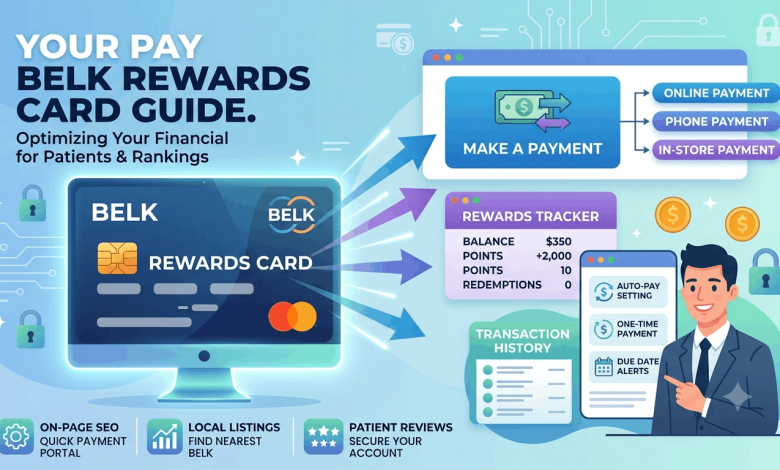
Synchrony gives Belk cardholders five separate payment channels. Pick whichever matches how much time you have before the due date.
Pay Online Through Your Account
Log in to your belkcredit.com account and click the “Payments” tab. From there, choose your payment amount, pick a date, and select the bank account you’re paying from. This method also lets you set up autopay so a missed due date never happens again.
Pay as a Guest, No Login Needed
If you don’t want to register an account, Synchrony offers a guest payment option right on the belk credit card login page. Enter your card number, the last four digits of your Social Security number, and your billing zip code, then follow the on-screen steps. It’s a genuinely useful shortcut if you just need to make one quick payment and don’t plan on managing the account online long-term.
Pay by Phone
Call the automated payment line and follow the voice prompts. Have your checking account number and routing number ready before you dial, since the system asks for both. Making a payment through the automated system is free, though an expedited phone payment made with a live representative usually carries a fee.
Pay by Mail
Send a check or money order, never cash, to the payment address printed on your billing statement. Write your account number directly on the check in case it gets separated from the payment coupon. Mail early. Postal payments can take several business days to post, and a late payment doesn’t care that the mail was slow.
Pay in Store
Every Belk store location accepts credit card payments at the customer service desk. This works well if you’re already heading to Belk anyway or if you’d rather hand a payment to a person than deal with a screen.
What Happens If You Pay Late
Belk credit card payments are due by 5 p.m. Eastern on the date listed on your statement. Miss that window and a late fee applies, typically around $29 for a first offense. If you’ve had a late fee within the prior six billing cycles, that fee jumps to roughly $40 the next time it happens.
Late payments do more than cost you a fee. They can also affect your credit score if reported to the bureaus, and depending on your account terms, a missed payment may trigger a penalty APR that’s noticeably higher than your standard rate. If a payment is going to be late, calling customer service before the due date, rather than after, gives you a better shot at working something out.
Registering, Activating, and Managing Your Account Online
New cardholders need to activate a physical card before using it, which is a separate step from registering for online account access. Activation typically happens through a dedicated link or phone number included with your card mailer, and you’ll need your card details on hand.
Once your card is active, registering for the online portal unlocks a few things worth using regularly:
- Viewing your FICO score for free, updated monthly
- Signing up for paperless statements
- Checking your current point balance and reward tier progress
- Setting up autopay and payment reminders
- Updating your mailing address or phone number
A small but genuinely useful detail: Belk Rewards+ points expire if your account goes twelve consecutive months without a qualifying purchase. Logging in occasionally to check your balance is a good habit even in months you’re not actively shopping.
Belk Credit Card Customer Service Contact Options
If the belk card login page isn’t loading, or you need help with something the website can’t resolve, customer service is reachable by phone. Representatives are generally available Monday through Friday from early morning to evening Eastern time, with shorter weekend hours on Saturday and Sunday.
Keep your account number or the last four digits of your Social Security number handy before calling. It speeds up identity verification considerably, and phone reps will ask for it almost immediately.
Frequently Asked Questions About the Belk Credit Card Login
How do I pay my Belk credit card online?
Log in to your account at www.belkcredit.com and select the Payments tab. Choose your amount, your payment date, and the bank account you want to pay from, then confirm. You can also set up automatic monthly payments from the same screen.
What is belkcredit.com and how is it different from belk.com?
Belkcredit.com is the Synchrony Bank portal that handles your Belk credit card account, payments, and statements. Belk.com is the retailer’s shopping site. They use separate login credentials, so your shopping password won’t get you into your credit account.
Can I pay my Belk credit card without logging in?
Yes, Synchrony offers a guest payment option on the belk credit card login page. Enter your card number, the last four digits of your Social Security number, and your billing zip code to submit a payment without creating an account.
Who is the Belk credit card issuer?
Synchrony Bank issues the Belk Rewards+ card and the Belk Rewards+ Mastercard. Synchrony also issues cards for several other retail brands, which is why the login portal and customer service line are separate from Belk’s main retail systems.
What happens if I forget my belk credit card login password?
Click “I forgot my User ID or Password” on the belkcredit.com sign-in page. You’ll confirm your identity using your account number and billing zip code, then follow the prompts to reset your password.
How much is the late fee on a Belk credit card?
A first late fee is typically around $29. If you’ve had a late fee within the previous six billing cycles, the fee increases to roughly $40 for the next missed payment. Fees and terms can vary by account, so check your cardholder agreement for your specific numbers.
Does the Belk credit card affect my credit score?
Yes. Like any credit card, on-time payments can help build your credit history, while missed or late payments can lower your score if reported to the credit bureaus. Keeping your balance well below your credit limit also helps your utilization ratio.
Can I check my Belk Rewards points without logging in?
Not directly. Point balances are tied to your online account, so you’ll need to log in at belkcredit.com or check a recent billing statement to see your current point total and reward tier.
Is there a Belk credit card app?
Belk cardholders manage their account primarily through the belkcredit.com website and the Synchrony Bank mobile app, which lets you check balances, make payments, and view your FICO score from your phone.
Managing Your Belk Card Doesn’t Have to Be a Hassle
The belk credit card login lives at belkcredit.com, separate from your regular Belk shopping account, and Synchrony Bank gives you five real ways to pay: online, by phone, by mail, in store, or as a guest without logging in at all. Set up autopay once you’re registered, and you’ll never have to think about a due date again.
If you’re weighing this card against other retail credit options, check out our guides on comparing store credit cards and understanding credit card APR before you apply for anything new. And if login trouble follows you to other retail accounts, our guide to recovering online store logins covers the same troubleshooting steps that worked here.