You’re standing in line at 8 a.m., trying to pay your internet bill from your phone before it’s late, and the login page just won’t cooperate. It happens to more Windstream customers than you’d guess. Between old bookmarks, a rebrand to Kinetic, and a few different portals depending on what you’re trying to do, the Windstream login process trips people up constantly.
Here’s the good news: once you know which URL goes with which task, logging in takes about ten seconds. This guide covers every version of the Windstream login you might need, what to do when your credentials stop working, and how to get your email running on your phone or in a desktop app.
Why There Are Multiple Windstream Login Pages
Windstream used to run everything through windstream.net, including account management and email. That changed when the company launched Kinetic by Windstream as its residential brand. Account management moved to a new portal, but email stayed on its original system.
That split is the root of most login confusion. Someone types in an old address expecting to reach their bill, and instead they land somewhere unfamiliar or get redirected in circles. Knowing which login goes where fixes this instantly.
Windstream Login URLs, Sorted by What You Need
Paying your bill, managing your plan, or checking your data usage Go to kinetic.com and click “Sign In” in the top right corner. This is the current home for Windstream residential account management.
Checking your windstream.net email Go to webmail.windstream.net. This is the dedicated email portal, separate from the account dashboard, and it’s where your inbox actually lives.
Old bookmarks pointing to windstream.net or www.windstream.net These addresses often redirect somewhere, but not consistently. Skip the guesswork and go straight to kinetic.com or webmail.windstream.net instead.
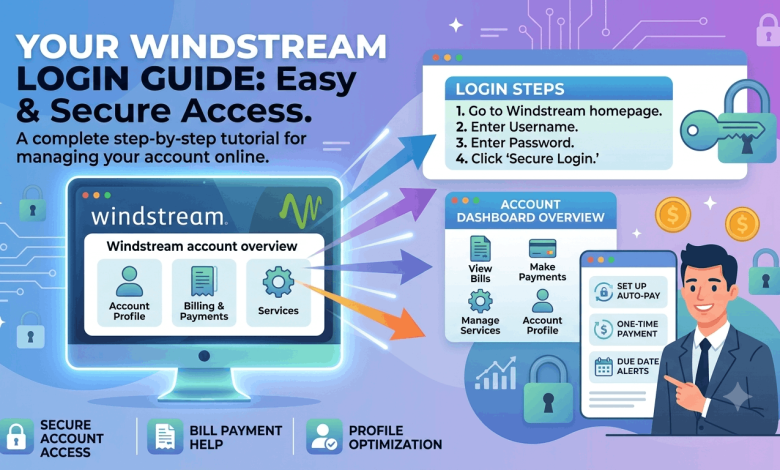
How to Log In to Your Windstream Account, Step by Step
- Open your browser and navigate to kinetic.com.
- Click “Sign In” near the top of the page.
- Enter your username, usually the email address tied to your account.
- Enter your password and submit.
- If two-factor authentication is turned on, enter the code sent to your phone or backup email.
You’ll land on your account dashboard, where billing, usage, and settings all live in one place.
How to Check Your Windstream Email
- Go to webmail.windstream.net.
- Type your full windstream.net address into the username field.
- Enter your email password.
- Click “Sign In.”
Your inbox loads directly in the browser. It’s a basic interface, nothing flashy, but it handles reading, replying, and organizing mail without issues.
Setting Up Windstream Email in Outlook, Apple Mail, or Gmail
If you’d rather check your windstream.net email from a regular mail app instead of the browser, use these settings:
Incoming mail (IMAP)
- Server: imap.windstream.net
- Port: 993
- Security: SSL/TLS
Outgoing mail (SMTP)
- Server: smtp.windstream.net
- Port: 587
- Security: STARTTLS
Your username is your full windstream.net email address, and your password is the same one you use on the webmail site.
Fixing Common Windstream Login Problems
Wrong URL. This is the single most common issue. Bookmark kinetic.com for account tasks and webmail.windstream.net for email, and you’ll avoid nine out of ten login headaches.
Incorrect or expired password. Click “Forgot Password” on the login screen. You’ll verify your identity with your account number or recovery email, then set a new one. Check your spam folder if the reset email doesn’t show up within a few minutes.
Account temporarily locked. Several failed attempts in a row can trigger a short lockout. Wait 15 to 30 minutes, or use the password reset link to get back in sooner.
Browser cache or cookies causing problems. Clear your cache, try an incognito window, or switch browsers entirely. Older browser versions sometimes don’t render newer login pages correctly.
Service outage. Occasionally the problem isn’t you at all. Check Downdetector to see if other Windstream customers are reporting the same issue before troubleshooting further on your end.
Managing Your Account Once You’re Logged In
Your Kinetic dashboard covers more than just bill pay. You can set up autopay, review past statements, and switch between card and bank transfer payments. The usage meter shows exactly how close you are to any data cap on your plan, which matters if you’re trying to avoid overage charges.
Contact details, like your recovery email and phone number, live under account settings. Keeping these current means password reset emails and service alerts actually reach you.
Using Windstream Login on Your Phone
The Kinetic app, available for iOS and Android, covers bill pay, service status, and basic troubleshooting from your phone. For email specifically, the mobile browser version of webmail.windstream.net works but isn’t built for small screens. Setting up your address in your phone’s native mail app using the IMAP and SMTP details above gives you a noticeably better experience.
Getting Help From Windstream Support
- Phone: 1-800-347-1991 for residential support. Weekday mornings tend to have shorter hold times.
- Live chat: Available on the Kinetic website during business hours, usually faster than calling.
- Social media: Windstream’s Twitter/X account often responds to direct messages when other channels are slow.
- Community forums: Reddit’s r/windstream and Windstream’s own community boards are worth a search before you call, since plenty of login issues have already been solved there.
Frequently Asked Questions About Windstream Login
What is the correct Windstream login URL? Use kinetic.com for account management and webmail.windstream.net for email. Older addresses like windstream.net may redirect inconsistently, so going directly to these two saves time.
How do I check my windstream.net email? Go to webmail.windstream.net and sign in with your full email address and password. You can also connect it to a mail app like Outlook or Gmail using Windstream’s IMAP and SMTP settings.
Why does my Windstream login keep failing? The usual causes are an outdated URL, an incorrect password, a temporary lockout after failed attempts, or a browser cache issue. Reset your password first, then clear your cache if the problem continues.
Is windstream.net still a working login page? Not reliably. Most account functions moved to kinetic.com, and email now runs through webmail.windstream.net. Redirects from the old address happen but aren’t guaranteed.
How do I reset my Windstream email password? Go to webmail.windstream.net and select “Forgot Password.” Verify your identity using your account number or recovery email, then follow the prompts to create a new one.
Can I access Windstream email from my phone? Yes. Use the mobile browser version of webmail.windstream.net, or set up your address in your phone’s mail app for a smoother experience.
What do I do if webmail.windstream.net won’t load? Check Downdetector for a known outage first. If nothing shows up, clear your browser cache, disable extensions, or try a different browser before contacting support.
How do I add Windstream email to Outlook? Use imap.windstream.net on port 993 with SSL for incoming mail, and smtp.windstream.net on port 587 with STARTTLS for outgoing mail. Your username is your full email address.
Why is my Windstream email not receiving new messages? Check your spam folder first, since misrouted mail often ends up there. If nothing is arriving at all, confirm your storage isn’t full and double-check your IMAP settings if you’re using an outside mail app.
Get Back Into Your Account
Two things solve almost every Windstream login problem: the right URL and a working password. Kinetic.com handles your account, webmail.windstream.net handles your email, and password resets fix most access issues in a few minutes.
If you’re still stuck after trying the steps above, Windstream’s live chat or phone support can usually sort it out quickly. You can also check out related guides on reuterings.com covering ISP password resets, IMAP email setup, and troubleshooting broadband connections.