You just financed a new Kia, and now you’re staring at a login screen that won’t accept your password. It happens more than you’d think. Between kiafinance.com, the Kia Owners Portal, and a handful of look-alike sites that pop up in search results, finding the real Kia Motors Finance company login page trips up plenty of new borrowers.
This guide walks you through exactly where to log in, how to set up your account the first time, what to do when your password won’t work, and how to make a payment once you’re inside. By the end, you’ll know your way around the kiafinance.com login screen well enough to handle it without a second thought.
What Is Kia Motors Finance, Exactly?
Kia Motors Finance America (often shortened to KMF or KMFUSA) is the financing arm that handles loans and leases for Kia buyers in the United States. It’s a separate entity from your local Kia dealership, so once your loan closes, your dealership steps back and Kia Finance America takes over billing, statements, and account support.
Through your online account, you can view your loan balance, schedule payments, request a payoff quote, update your address, and download tax documents. Kia Finance America also handles lease-end options, so if you’re nearing the close of a lease, this is the same account where you’ll start that process.
One thing worth knowing upfront: Kia Motors Finance America is not the same company as Kia Finance UK or Kia Finance Canada. Each region runs its own portal with its own login system, so if you financed your Kia outside the US, the steps below won’t apply to your account.
Where to Find the Official Kia Finance Login Page
The real login page lives at kiafinance.com. Kia also routes customers through its owner portal at owners.kia.com, which links directly to the same account system. Bookmark one of these two addresses and use it every time, rather than searching “kia finance login” and clicking whatever link appears first.
That search habit is exactly how people end up on the wrong page. A search for kiafinance com login often surfaces third-party blogs and near-identical domains built to mimic the real site and collect ad clicks, or worse, harvest login credentials. Before you type in your username and password, check the address bar. If it doesn’t read exactly kiafinance.com, close the tab.
A few markers of the genuine site:
- The URL starts with https:// and shows a padlock icon
- The page displays “Kia Finance America” branding, not a generic template
- There’s no request for your Social Security number just to view the login form
How to Log In to Kia Finance: Step-by-Step
Logging in only takes a minute once you know the layout. Here’s the exact process.
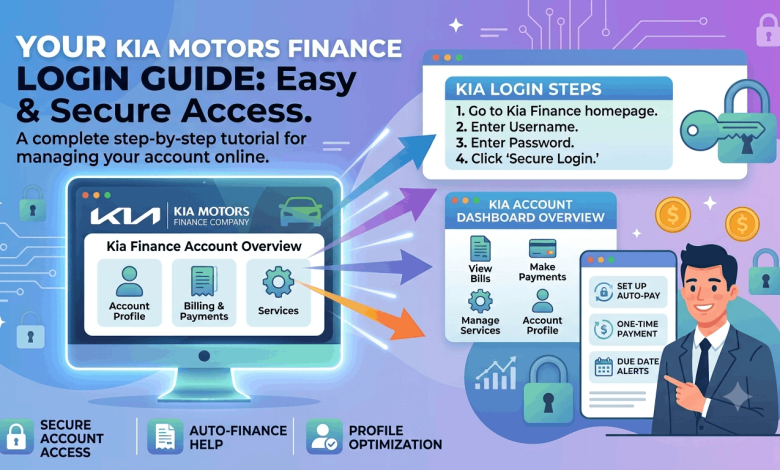
- Go to kiafinance.com and locate the “Log In” button, usually in the top right corner of the homepage.
- Enter your username. This is typically the email address you used when you registered the account, unless you set a custom username during signup.
- Type your password. Kia’s login system is case-sensitive, so double-check capital letters and any special characters before hitting submit.
- Click “Sign In.” If your details match, you’ll land on your account dashboard within a few seconds.
- Complete two-factor verification if prompted. Logging in from a new device or browser sometimes triggers a text or email code for extra security.
If everything checks out, you’ll see your account summary, current balance, next due date, and payment history on one screen. From there, every other feature, like making a payment or updating your address, sits a click or two away.
Setting Up Your Account for the First Time
If you’ve never registered, you’ll need to create your kiafinance.com login before you can sign in. Kia requires a few pieces of information to match you to your loan file: your account number (found on your first billing statement), your date of birth, and the last four digits of your Social Security number.
During registration, you’ll choose a username and password, and you’ll add a phone number or email for account recovery. Save that password somewhere secure. Kia’s system locks accounts after several failed attempts, and unlocking one usually means a call to customer support.
Fixing Common Kia Finance Login Problems
Almost every login issue falls into one of these categories, and each one has a quick fix.
Forgot your password? Click “Forgot Password” on the login screen, enter your registered email, and follow the reset link Kia sends you. New passwords typically need a mix of letters, numbers, and one special character.
Forgot your username? Select “Forgot Username,” enter your email address, and Kia will send your login name directly to your inbox.
Account locked out? This usually happens after three to five failed login attempts. You’ll need to wait out the lockout window or call Kia Finance America customer support to unlock it manually.
Page won’t load or keeps timing out? Clear your browser cache, try a different browser, or switch off any VPN before attempting the kia finance log in again. Older browser versions sometimes struggle with Kia’s security scripts.
Getting an error after entering correct details? Double-check for autofill mistakes. Browsers sometimes autofill an old password from a different site under the same saved username.
Making a Kia Finance Payment Login Once You’re In
Once you’re logged in, paying your bill takes just a few clicks:
- Select “Make a Payment” from your dashboard menu.
- Choose between a one-time payment or setting up AutoPay for recurring monthly withdrawals.
- Enter your bank account and routing number, or select a saved payment method.
- Pick your payment date and confirm the amount.
- Review the confirmation screen and save or screenshot your receipt.
Payments submitted before 8:00 p.m. Eastern typically post the same day. Anything submitted after that cutoff rolls over to the next business day, so keep that in mind if your due date is approaching and you’re paying at the last minute.
If you’d rather not pay online, Kia Finance America also accepts payments by phone through its automated system, by mail with a payment coupon, or through Western Union Quick Collect if you need to pay with a debit or credit card (a convenience fee applies).
What You Can Do From Your Kia Finance Account
Beyond payments, your kiafinance.com login unlocks a handful of tools most owners don’t use until they need them:
- Payoff quotes showing the exact amount to close out your loan early
- Statement history for tax season or loan verification
- Address and contact updates so billing notices reach you
- Paperless billing enrollment to cut down on mailed statements
- Lease-end options, including buyout quotes and return scheduling
Keeping Your Kia Finance Login Secure
Auto loan accounts are a common phishing target, since they combine a Social Security number, a bank account, and a vehicle title in one place. A few habits go a long way toward protecting yours:
- Type kiafinance.com directly into your browser rather than clicking email links
- Avoid saving your password in shared or public computers
- Turn on two-factor verification if Kia offers it for your account
- Watch for phishing emails claiming your “account is suspended” and asking you to click through to log in
If you ever get a text or email that feels off, call Kia Finance America directly using the number on your billing statement rather than any number or link included in the message itself.
Frequently Asked Questions About Kia Finance Login
What is the official kiafinance.com login page?
The official login page is kiafinance.com, Kia Motors Finance America’s dedicated site for loan and lease account management. You can also reach the same login through owners.kia.com. Avoid similarly named domains that show up in search results but aren’t run by Kia directly.
How do I reset my Kia finance login password?
Click “Forgot Password” on the kiafinance.com login screen and enter the email tied to your account. Kia sends a reset link to that inbox within a few minutes. Follow the link and choose a new password that meets the site’s character requirements.
Why won’t my kia financial login accept my password?
Password fields on kiafinance.com are case-sensitive, so a mismatched capital letter is the most common cause. Autofill errors from saved browser passwords are another frequent culprit. Clear the field and type your password manually before trying again.
Can I make a Kia finance payment login without registering an account?
Yes, Kia Finance America allows guest payments by phone through its automated system or by mailing a check with your account number. However, you’ll get access to payment history, AutoPay, and payoff quotes only through a registered kiafinance.com account.
Is kiafinance.com the same as my local Kia dealership account?
No. Your dealership handles the vehicle purchase, but Kia Motors Finance America manages the loan itself once financing closes. Your dealership cannot reset your kiafinance.com login or adjust your payment schedule.
What information do I need to register for Kia finance log in access?
You’ll need your Kia Finance account number, date of birth, and the last four digits of your Social Security number. These details confirm your identity and link your new login to the correct loan file.
How long does a Kia finance payment login take to post?
Payments submitted before 8:00 p.m. Eastern time post the same day. Payments made after that cutoff process on the next business day, so time your payment accordingly if you’re close to your due date.
What do I do if my Kia finance account gets locked?
Multiple failed login attempts trigger an automatic lockout. Wait a short period and try again, or call Kia Finance America customer support directly to have the account unlocked sooner.
Does Kia Finance charge a fee for online payments?
Standard online payments through kiafinance.com carry no extra fee. Paying by credit or debit card through Western Union Quick Collect does include a convenience fee, so ACH bank payments through your account remain the cheaper option.
Get Back Into Your Kia Finance Account
The kiafinance.com login process comes down to three things: using the correct official domain, keeping your password details accurate, and resetting quickly through the official recovery tools when something doesn’t match. Skip the look-alike sites, bookmark the real page, and your account stays one click away every month.
Ready to explore more about managing your Kia? Check out our other guides on car loan payoff strategies, choosing between a lease and a loan, and building credit before your next vehicle purchase.